VPS WEBHOOK RELAY • BRING YOUR OWN API

Trading DeckX
Controller

Automate Any TradingView Strategy

Bring your own ProjectX API and trade any TradingView strategy. Professional desktop application that executes trades directly from TradingView alerts with our VPS-powered webhook relay system.

< 50ms
Signal Latency
24/7
VPS Uptime
Strategies
BYO API
Your Broker
FREE BONUS INCLUDED

Free TradingView Strategy

Get our proven TradingView strategy absolutely free with any purchase. Pre-configured for automated execution with the Trading DeckX Controller.

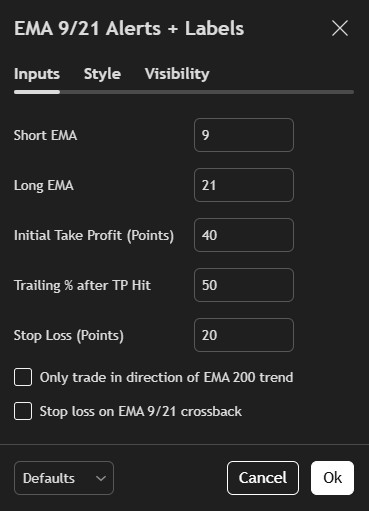
Strategy Settings
TradingView Strategy Settings
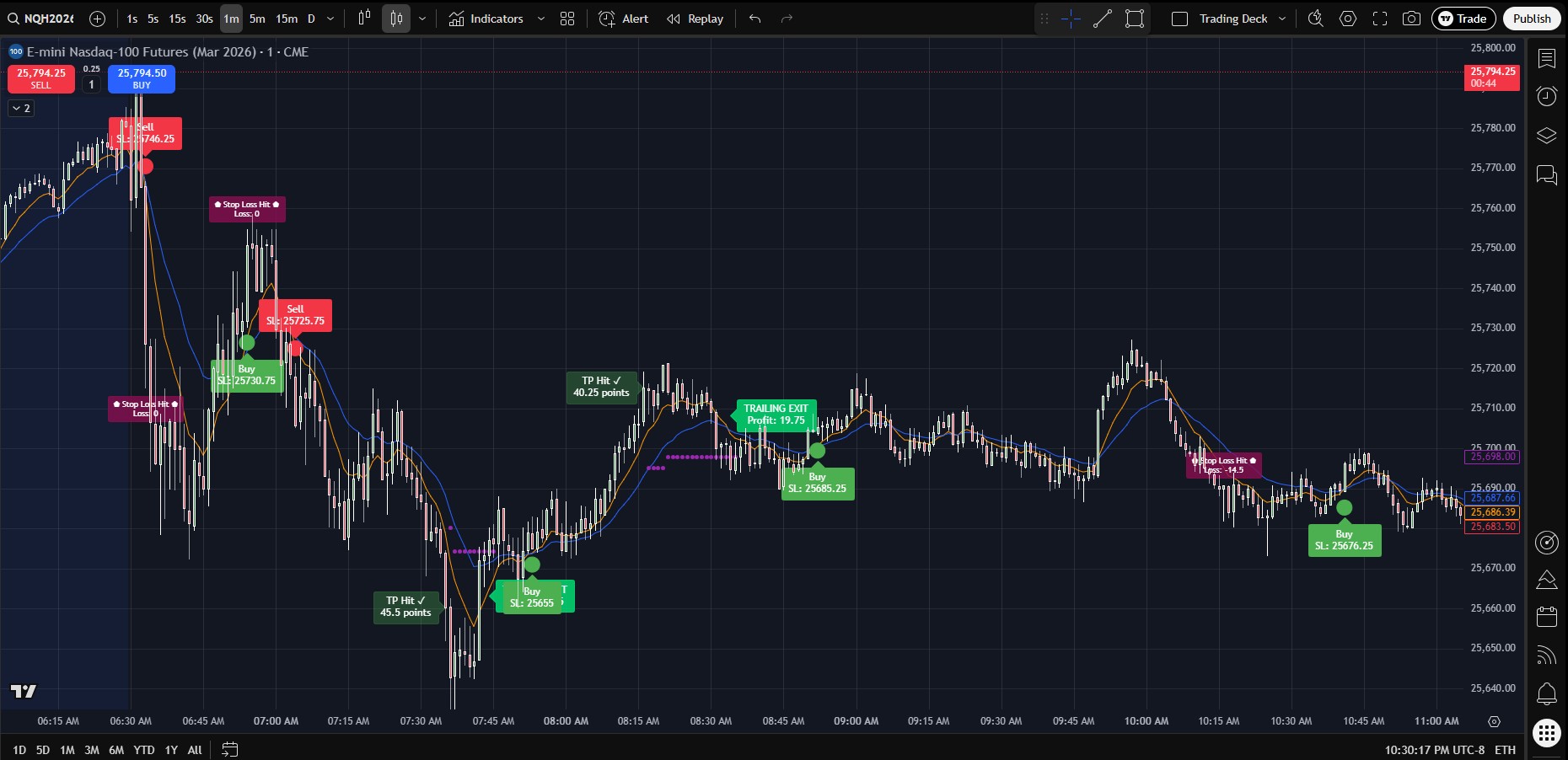
Live Trading - Any Market
LIVE
Live Trading Chart with Signals

Any Strategy

Works with any TradingView strategy

Your API

Use your own ProjectX API

VPS Relay

Reliable webhook relay system

Auto Signals

Buy/Sell alerts included

Powerful Features

Everything you need to automate any TradingView strategy

Bring Your Own API

Connect your own ProjectX API and trade with your preferred broker. Full control over your trading infrastructure.

Trade Any Strategy

Works with any TradingView strategy. No limitations. Use your favorite indicators, custom scripts, or paid strategies.

VPS Webhook Relay

Professional VPS-powered webhook relay system ensures reliable signal delivery 24/7 with minimal latency.

Real-Time Execution

Lightning-fast signal relay ensures your trades are executed at the best possible prices with minimal slippage.

Secure Connection

Bank-level AES-256 encryption protects your API keys and trading data at all times.

Desktop Application

Professional desktop application with intuitive interface. Easy setup and configuration in minutes.

How It Works

Get started in three simple steps

1

Download & Setup

Download the Trading DeckX Controller app and connect your ProjectX API

2

Connect TradingView

Copy your unique webhook URL to any TradingView strategy alerts

3

Start Trading

Enable auto-trading and let the system execute your strategy

Video Tutorial

Watch how to set up and use Trading DeckX Controller

Complete Setup Guide - Trading DeckX Controller

License Activation

Learn how to activate your license key

API Connection

Connect your ProjectX API credentials

Auto Trading

Start automated trade execution

Simple Pricing

Start trading with Trading DeckX Controller today

⚡ Best Value

Lifetime

$ 699 one-time

Pay once, own forever

  • All Monthly Features
  • Lifetime License
  • All Future Updates
  • Priority Support
  • No Recurring Fees
Get Lifetime Access

After purchase, you'll receive an email with your license key, webhook URL, and the free strategy.

Download Trading DeckX Controller

Free download • License key required for activation

Windows v1.0.2

License key required for activation • Free TradingView strategy included with purchase

Trading Software Disclaimer & Risk Acknowledgment

Please read this disclaimer carefully before downloading Trading Deck Controller or Trading DeckX Controller.

Not Financial Advice

Smart Folder and its software products (Trading Deck Controller and Trading DeckX Controller) are technology tools designed to facilitate automated trading execution. We are not financial advisers, investment advisers, or registered brokers. The software does not provide financial, investment, or trading advice. All trading decisions and strategies are your own.

Trading Risks

Trading financial instruments involves substantial risk of loss. You may lose some or all of your capital. Past performance does not guarantee future results. You are solely responsible for:

  • Your trading decisions and strategies
  • Managing your risk and position sizing
  • Understanding the markets you trade
  • Complying with applicable laws and regulations

Technical Risks & Limitations

The software relies on technology that may be subject to:

  • Internet connectivity issues, outages, or interruptions
  • Network latency or delays in signal transmission
  • Software bugs, errors, or malfunctions
  • Third-party service disruptions (TradingView, broker APIs, VPS services)
  • System failures or maintenance
  • Data transmission errors

We do not guarantee:

  • Uninterrupted service or 100% uptime
  • Zero latency or instant execution
  • Error-free operation
  • Successful trade execution in all circumstances

User Responsibility

By using this software, you acknowledge that:

  • You understand the risks involved in automated trading
  • You have sufficient knowledge and experience to use automated trading systems
  • You will monitor your trades and take responsibility for all trading activity
  • You will not hold Smart Folder liable for any trading losses or technical issues
  • You are using the software at your own risk

No Warranties

The software is provided "as is" without warranties of any kind, express or implied. We disclaim all warranties including merchantability, fitness for a particular purpose, and non-infringement.

Limitation of Liability

Smart Folder shall not be liable for any direct, indirect, incidental, special, consequential, or punitive damages arising from your use of the software, including but not limited to trading losses, lost profits, or data loss.

Free TradingView Strategy Terms

As a subscriber, you receive access to our TradingView strategy free of charge as part of your subscription. By accepting these terms, you acknowledge and agree that:

  • The free TradingView strategy is included only while your subscription remains active
  • If you cancel your subscription, you will immediately lose access to the TradingView strategy
  • If you wish to retain access to the strategy after cancellation, you must pay the standalone strategy fee of $49/month
  • Smart Folder reserves the right to revoke strategy access upon subscription cancellation
  • The strategy added to your TradingView account remains the intellectual property of Smart Folder

Last updated: January 20, 2026